
A shared glossary gives remote teams one agreed meaning for terms that affect code, releases, and incident response. Start with 5–10 high-risk terms, give each an owner, and publish approved definitions in one place.
The process has nine steps:
- Rank terms by risk and ambiguity.
- Define each concept with clear boundaries and examples.
- Resolve conflicting meanings before approval.
- Assign a steward and domain reviewers to own the process and check definitions.
- Add translations only when technical reviewers confirm the meaning.
- Set approval rules so drafts stay separate from approved entries.
- Link entries in team tools instead of copying definitions.
- Review terms as systems change, with annual checks for stable entries.
- Track gaps and assign fixes, then review the first batch after 30 days.
The test is simple: Can two teams read the same term and agree on what happens next?
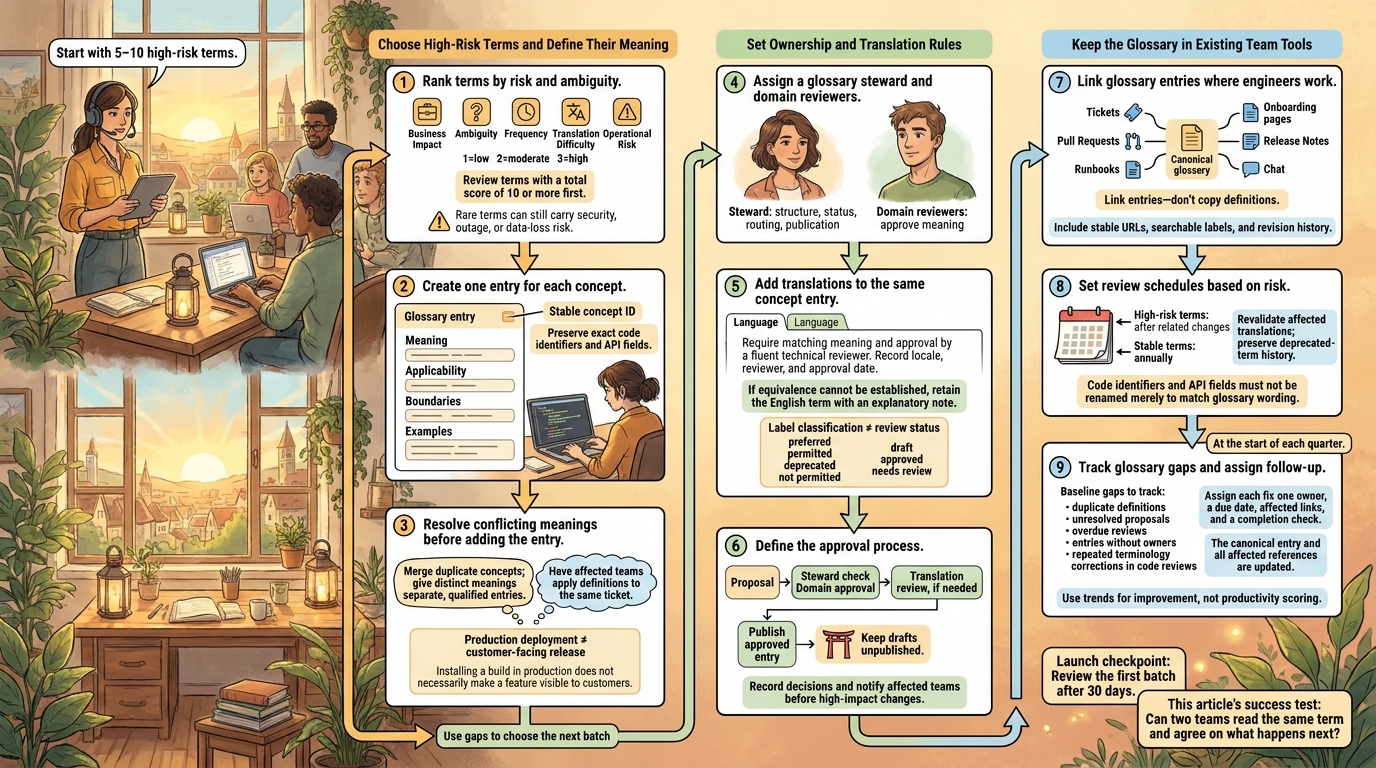
How Remote Engineering Teams Build a Shared Glossary
Choose High-Risk Terms and Define Their Meaning
1. Rank Terms by Risk and Ambiguity
Scan tickets, pull requests, APIs, schemas, runbooks, incidents, requirements, and customer docs for terms that cause clarification requests, rework, inconsistent implementation, or translation questions. Start with overloaded terms, acronyms, words used across teams, including those in staff augmentation models, and language tied to security, reliability, data, or releases.
Score each term from 1–3 for business impact, ambiguity, frequency, translation difficulty, and operational risk: 1 = low, 2 = moderate, and 3 = high. Review terms with a total score of 10 or more first.
Record the evidence behind every score. A term used rarely can still carry security, outage, or data-loss risk - don’t let low frequency push it down the list.
Use these rankings to decide which terms enter the glossary first.
2. Create One Entry for Each Concept
Define what each concept means in your system, where it applies, and what it excludes. Keep examples separate from the definition. Preserve exact code identifiers, API fields, proper names, and established acronyms. Explain them; don’t rename them.
Use this entry template:
- Concept ID: Keep it stable even if the preferred term changes.
- Preferred English term: The approved en-US label.
- Plain-language definition: Meaning, applicability, and boundaries.
- Domain
- Allowed alternatives: Synonyms or acronyms, including limits on their use.
- Disallowed terms: Keep deprecated terms searchable.
- Usage example
- Related concepts
- Do not confuse with: Similar concepts and their key differences.
- Owner and reviewers
- Approval status: Draft, approved, under review, or deprecated.
- Creation date and last review date: Use separate fields and an unambiguous date format.
- Source or rationale
Once you’ve defined the concept, settle any competing meanings before adding translations.
3. Resolve Conflicting Meanings Before Adding the Entry
Search existing entries before creating another. Merge duplicates that describe the same concept. If meanings differ, create separate entries with clear qualifiers, such as Deployment - software engineering, Release - product management, and Release - software engineering.
Have reviewers from the affected teams apply each definition to the same ticket. If they still interpret it differently, the wording isn’t ready.
Hypothetical example: In the request “Release the new billing workflow to production Friday,” engineering may mean deploying a build, while product means enabling customer access. Record the approved definitions and ticket wording:
- Deployment: Installing a specified build in an environment.
- Production deployment: Installing that build in the production environment; it does not necessarily make a feature visible to customers.
- Customer-facing release: Enabling an approved feature for its intended customer population and communicating its availability.
- Preferred ticket wording: “Deploy build
billing-2026.11.27to production on November 27, 2026; enable the workflow for 10% of customers after validation.”
Record the rationale, approver, affected systems, and date before teams reuse the wording in tickets, code reviews, dashboards, and runbooks.
Once the meaning is settled, assign ownership and translation rules before publishing.
Set Ownership and Translation Rules
4. Assign a Glossary Steward and Domain Reviewers
Once meanings are settled, decide who can approve them.
Give one steward ownership of structure, status, routing, and publication. Let domain reviewers approve meaning. Name reviewers for architecture, infrastructure, security, data, QA, and product. Smaller teams can combine roles, but each domain still needs an accountable reviewer and an escalation contact.
| Ownership model | Approval speed | Consistency | Accountability |
|---|---|---|---|
| Centralized ownership | Fast for routine terms; one person can become a bottleneck as volume grows | Strong across entries | One steward owns every decision |
| Domain ownership | Fast within domains; cross-domain decisions take longer | Can vary across domains | Specialists own their terminology |
| Shared approval | Depends on reviewer availability | Strong with steward oversight | Steward owns the process; reviewers own meaning |
Start with one steward and domain reviewers. This keeps technical checks in place without sending every entry to every reviewer.
5. Add Translations to the Same Concept Entry
Add a translation to the same concept entry only when the locale needs it, the meaning matches, the label fits technical use, a fluent technical reviewer approves it, and no competing label exists. Record the locale, such as es-MX or pt-BR, along with the reviewer and approval date. Knowing the language isn’t enough - the reviewer must also understand the technical context.
Explain why regional or audience variants are needed and where each applies. Document imperfect equivalents and their limits. If you can’t establish equivalence, keep the English term and add an explanatory note. Preserve identifiers and names left untranslated on purpose.
Keep label classification - preferred, permitted, deprecated, or not permitted - separate from review status - draft, approved, or needs review. A deprecated label can stay in the glossary, but it should not be used for new work.
6. Define the Approval Process
Let anyone propose a term. Require its source sentence, source link, proposed meaning, domain, affected locales, and a reason to include it.
Send proposals through the steward, then to domain reviewers. Keep proposal and approval roles separate when possible. The steward checks for duplicates, gets domain approval, sends translations to a fluent technical reviewer, and publishes approved entries. Keep drafts unpublished.
For interface or procedure changes, record the reviewers, rationale, affected systems, effective date, and required updates. Send disagreements to the domain reviewer and steward first, then to engineering or product leadership. Mark disputed content needs review and name the temporarily preferred label so teams don’t create multiple unofficial terms. Notify affected teams before high-impact changes take effect.
After approval, put the entry in the team tools engineers already use.
Keep the Glossary in Existing Team Tools
7. Link Glossary Entries Where Engineers Work
Once approved, keep one canonical glossary in your documentation hub or repository, within the tools engineers already use. Give every entry a stable URL, searchable labels, and revision history.
Link to entries rather than copying definitions into tickets, pull requests, runbooks, onboarding pages, release notes, or chat. Add the glossary URL to issue and pull-request templates. For API or schema changes, link the relevant glossary entry to the endpoint, field, migration, or design document.
8. Set Review Schedules Based on Risk
Use the same risk ranking to set review frequency. Review high-risk terms after related product, architecture, security, API, schema, legal, or localization changes. Review stable terms annually.
Owners should record each review outcome and revalidate affected translations. Assign a new owner when ownership changes. For deprecated terms, keep redirects or historical notes so older tickets and runbooks still make sense.
Update affected linked references and user-facing labels, but don’t rename code identifiers or API fields just to match the glossary. Put those changes through normal compatibility checks, deprecation policies, and migration plans.
9. Track Glossary Gaps and Assign Follow-Up
Treat glossary health like other engineering work. At the start of each quarter, record a baseline count of duplicate definitions, unresolved proposals, overdue reviews, and entries without owners. Track repeated terminology corrections in code reviews alongside those counts.
Review trends during regular engineering reviews, but don’t use them as productivity metrics. Give each follow-up one owner, a due date, a list of affected links, and a clear completion check: the canonical entry and all affected references are updated.
Conclusion: Start With a Few High-Risk Terms
Start with high-risk terms. Define each one once, assign an owner, and approve translations only when needed. Publish the entries in your team’s tools and review them as the product changes.
This week, pick five to ten high-risk terms from recent incidents, design reviews, or support escalations. Give each term an owner and a domain reviewer, then publish the approved entries in your existing team documentation system. In 30 days, review the gaps to choose the next batch.
Hire Vetted Remote Software Engineers
Want to hire vetted remote software engineers and technical talent that work in your time zone, speak English, and cost up to 50% less?
Hyperion360 builds world-class engineering teams for Fortune 500 companies and top startups. Contact us about your hiring needs.
Hire Top Software DevelopersFrequently Asked Questions
How do we prioritize equally high-risk terms?
When terms carry the same level of risk, prioritize those whose unclear meanings lead to coordination gaps - such as infrastructure definitions, deployment policies, or hiring models. Record definitions in the tools your team already uses so people can search for them. Assign owners to keep each definition accurate.
For translated terms, use one version-controlled repository or central documentation hub. Keep translations next to the canonical definition and any context-specific requirements so meanings don’t conflict.
How can we encourage glossary use without slowing work?
Keep definitions easy to search in the tools your team already uses, written requirements, and decision logs. That way, decisions don’t get lost across time zones.
Start with high-risk terms tied to delivery control, roles, and compliance. Record one agreed meaning for each term, name an owner, and set clear rules for updates.
Add translated terms only after the glossary owner confirms they match the agreed meaning. This keeps competing definitions out of the glossary.
Comments